
By default, MainWP uses the Administration Email Address from your WordPress General Settings for email notifications. You can change the FROM address specifically for MainWP emails without modifying that WordPress setting.Documentation Index
Fetch the complete documentation index at: https://mainwp-mintlify-c0f00f42.mintlify.app/llms.txt
Use this file to discover all available pages before exploring further.
What You’ll Learn
- How to customize the FROM address for MainWP emails
- How to change it for specific email types only
Prerequisites
- Custom Dashboard extension (free)
Default Behavior
MainWP uses the email address configured in WP Admin > Settings > General under Administration Email Address.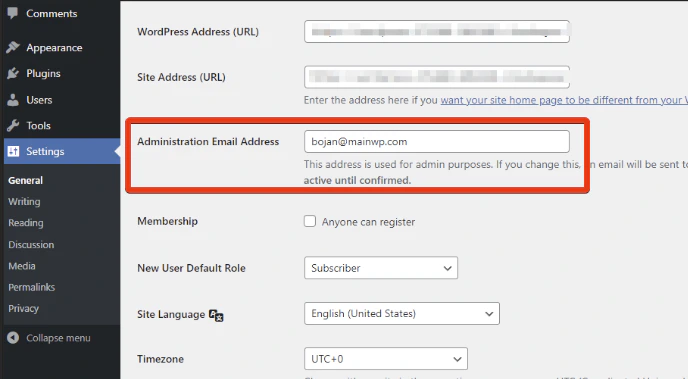
Change FROM Address for All MainWP Emails
Install Custom Dashboard
Install the Custom Dashboard extension.
Customize the values
Replace the placeholder values:
'Your Name'- The sender name recipients will see'your-email@example.com'- The email address to send from
Change FROM Address for Specific Emails Only
To customize the sender only for certain MainWP emails (e.g., Daily Digest), use this conditional version:$email and $subject conditions to match the emails you want to customize.
Common Use Cases
| Scenario | Solution |
|---|---|
| Brand all MainWP emails | Use the basic filter with your brand email |
| Separate addresses by type | Use conditional filter based on subject |
| Different sender for reports | Check for “Pro Reports” in subject line |
Self-Check Checklist
- Custom Dashboard extension installed
- PHP code added with your email details
- Changes saved
- Test email sent to verify new FROM address
Related Resources
- Dashboard Not Sending Emails - Email troubleshooting
- Edit Email Templates - Template customization
- Custom Dashboard Extension - Extension documentation